Apply For Shluchim/Wholesale Account Here


Programmable Holiday Lights: A Practical Guide


The courtyard display is assembled, guests are arriving, and the volunteer who knows the controls isn't there yet. Someone needs to select tonight's lights, someone else wants the display switched off after the event, and rain is forecast before closing. You don't just need a festive effect. You need equipment that the next person on duty can operate confidently.
Programmable holiday lights can help, but only if you choose controls that match the job. For a synagogue, community center, hotel, or municipal venue, the useful question isn't how many effects a display offers. It's whether the right lights will run on the right evening, survive ordinary seasonal conditions, and shut down safely.
Table of Contents
- What Programmable Holiday Lights Actually Are
- How Controllers, Apps, and Protocols Connect
- Features That Matter and What They Do
- Where Programmable Lights Make the Biggest Difference
- Energy Use and Operating Costs Over a Season
- Buying and Compatibility Considerations
- Setup, Operation, and Venue-Ready Safety
- Season-End Checklist and What Comes Next
What Programmable Holiday Lights Actually Are
Watch a coordinated holiday display and you might see building outlines brighten together while individual fixtures change color. The movement is the visible result. Programmability is the ability to define what the lights should do, when they should do it, and how they should look.
A traditional plug-in string illuminates when it receives power. Add a suitable timer, and you can automate its operating hours. More capable systems let you save brightness settings, select groups of lights, or run sequences without recreating the instructions every evening.
Think of a programmable thermostat
A programmable thermostat follows a schedule rather than waiting for someone to adjust it. Programmable lighting follows the same basic idea. Instead of requesting a room temperature, you request a lighting state, such as a steady courtyard display during visiting hours.
The system has distinct parts:
- Light source: The bulbs, strings, or illuminated fixtures produce the visible display. LED-based equipment is particularly relevant to repeated seasonal operation.
- Controller: A timer, control box, or compatible control system sends the instructions.
- Program: A schedule or saved scene specifies the intended result.
This concept map shows the range of equipment covered by the term.
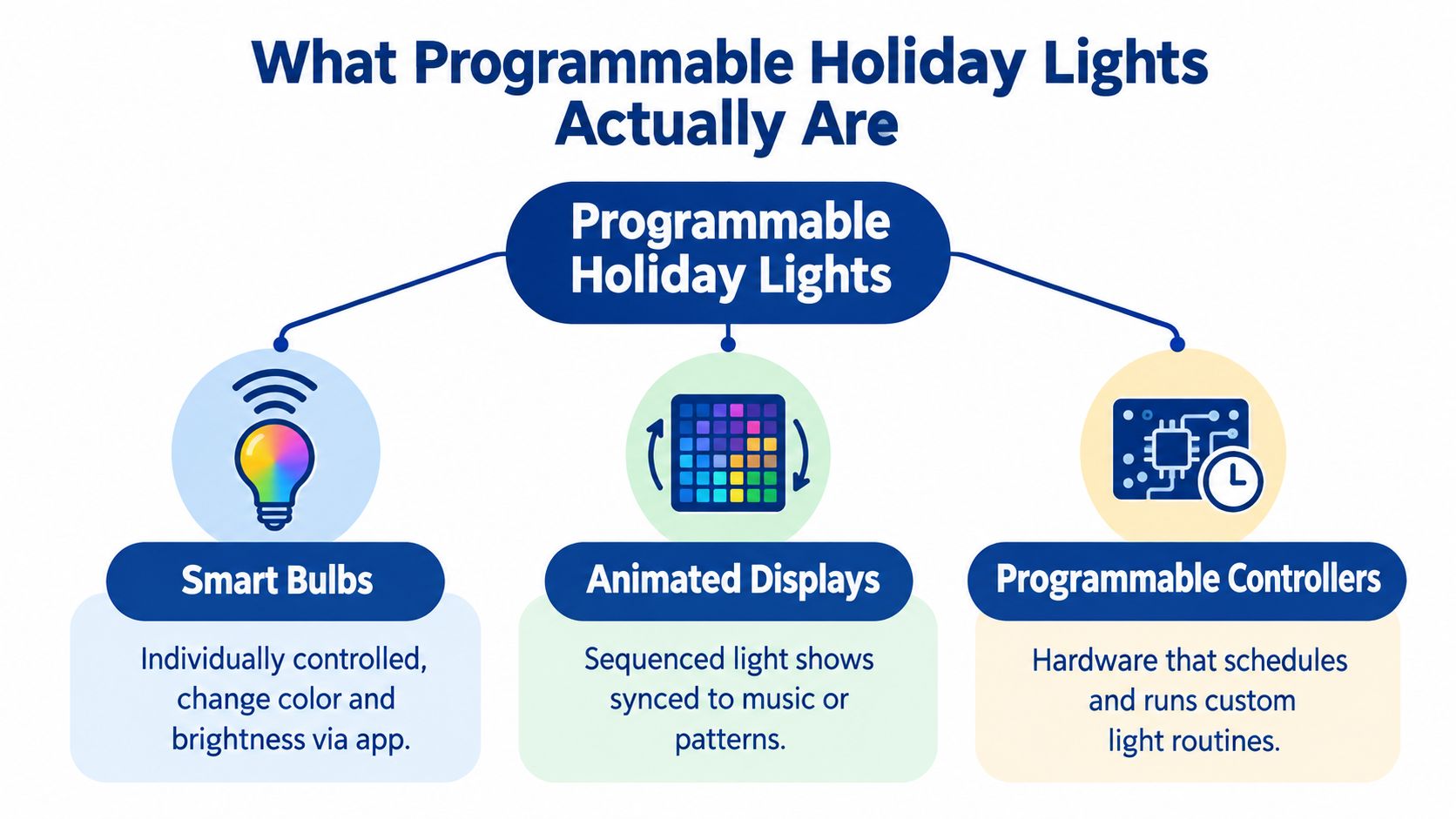
A scene is a saved appearance, like a lighting recipe. A schedule tells the controller when to use it. Those aren't interchangeable: a controller might remember a beautiful scene but still require someone to activate it.
For an institutional menorah, distinguish ordinary on/off timing from nightly progression. Turning the entire fixture on at dusk doesn't necessarily select the appropriate lights for that evening. Ask whether the controller can manage the holiday sequence itself or whether staff must change it manually.
Practical rule: Describe the behavior you need before choosing the equipment. “Run tonight's correct display and switch it off at closing” is a better starting point than “buy smart lights.”
How Controllers, Apps, and Protocols Connect
A controller is the system's brain; an app is often its dashboard. They may work together, but they aren't necessarily the same thing. You might use a phone to enter instructions that hardware later runs independently, or you might choose a system that needs an online service to execute part of the routine.
Protocols are the communication methods involved. Think of them as the language and delivery route for instructions. The practical issue is less about technical vocabulary and more about which parts must remain available.
| Control method | What to establish before installation |
|---|---|
| Local timer or wired controller | Whether it stores the required schedule and retains settings after power loss |
| Infrared remote | Whether staff can reach and operate the receiver from their working position |
| Bluetooth | Whether pairing and control work where the operator will stand |
| Wi-Fi | Whether the venue's network reaches the installation and permits the connection |
| Matter | Which functions appear in the chosen platform and which require another app |
Local control isn't the same as remote control
Don't assume a Wi-Fi connection automatically means internet-dependent operation. Equally, don't assume a saved app schedule lives inside the controller. Ask the supplier where the schedule is stored, what maintains the clock, and what happens when the internet connection disappears.
Matter compatibility also needs careful interpretation. Matter Alpha's explanation of holiday-light compatibility describes cross-platform power, brightness, and color control, while noting that some dynamic scenes still require the manufacturer's app and that control may apply a single color and brightness across an entire fixture.
For the synagogue's IT volunteer, a useful acceptance test is straightforward: configure the display, interrupt internet access, and check the intended behavior. Then establish how an authorized replacement operator gets access without relying on a departing volunteer's personal account.
Budget for that control arrangement alongside mounting and electrical work. Modern Yard Landscapes provides a resource to compare lighting installation costs, which can help frame questions about installation scope rather than just the price of the lights.
Features That Matter and What They Do
Start with scheduling, not animation. Decide when visitors should see the display and when staff need it dark. Then check whether the controller supports calendar dates, different operating days, and the kind of start time your venue needs.
A dusk-responsive setting can accommodate changing daylight, but it isn't the same as a fixed event start. Ask whether the equipment uses a light sensor or a calculated sunset time. For an indoor atrium, a precise calendar schedule may be more useful than a sensor affected by nearby lighting.
Match the feature to the task
- Brightness adjustment: Lets organizers choose an appropriate appearance for the viewing location. Test it from the entrance and nearby seating, not just beside the fixture.
- RGB color control: Combines red, green, and blue light to produce different colors. RGBW equipment adds a dedicated white-light component.
- Addressable lights: Allow separate control of individual points or segments, rather than forcing the whole string to behave alike.
- Scenes and effects: Save a steady appearance or a changing pattern that staff can recall without editing individual settings.
- Audio synchronization: Coordinates lighting with sound when the equipment supports it. Treat it as an event feature, not a requirement for routine nightly operation.
A multicolor fixture isn't automatically addressable. Likewise, an animated preset doesn't prove you can create your own sequence. Ask for a demonstration of the exact behavior you need rather than accepting a list of mode names.
For a temporary gathering space, plan decorative lighting alongside practical illumination. Premier Marquee Hire's marquee lighting guide is a relevant planning resource when your holiday event also involves a covered reception or temporary venue.
A display should still communicate its purpose when every special effect is turned off.
Create an accessible default scene with steady illumination, restrained brightness, and clear visual separation. Don't depend on color alone to communicate which parts are active. Give visitors sensitive to flashing effects a predictable presentation.
Finally, have the supplier identify which features work locally and which depend on an app or online service. That distinction belongs beside each promised feature, not buried in a general compatibility statement.
Where Programmable Lights Make the Biggest Difference
At home, the main problem may be remembering to turn a display off. At a public venue, it's often coordinating a changing display across shifts, events, and weather interruptions. The same controls can serve both settings, but the operating requirements differ.
This visual offers a broad comparison of display settings, rather than a measured ranking of their benefits.

Compare the operating problem
| Setting | Typical responsibility | Useful capability to verify |
|---|---|---|
| Home | A household member manages the display | Automatic start and shutoff |
| Public menorah or building installation | Organizers and facilities staff share duties | Correct nightly selection and repeatable operation |
| Vehicle-mounted display | An operator manages equipment before travel | A stable preset and accessible power isolation |
For a synagogue courtyard, consider the handoff between the event organizer and the closing custodian. The organizer needs the appropriate nightly appearance; the custodian needs an unambiguous shutdown procedure. A controller that handles progression but leaves closing instructions unclear solves only part of the problem.
Shopping centers and hotels may also need decorative fixtures to behave consistently around existing venue lighting. When considering commercial holiday decorations, specify viewing locations, operating responsibilities, and whether separate installations must run together.
Vehicle-mounted displays introduce different constraints. Treat vibration, mounting security, weather exposure, and the vehicle's power supply as installation questions, not software settings. Select the intended mode while parked, and don't plan a routine that requires the driver to adjust lighting while moving.
An assembly demonstration can help organizers understand the physical work involved before assigning volunteers.
For every setting, write down what counts as successful operation. A household might accept a missed decorative effect. A public menorah needs its intended nightly configuration, a clear responsible operator, and a workable response when something doesn't start.
Energy Use and Operating Costs Over a Season
Lighting costs depend on the equipment's power demand, operating hours, and electricity rate. Programmability primarily changes the hours; choosing LEDs changes the underlying demand. Keep those decisions separate when preparing a seasonal budget.
The scale is substantial: Indiana University's holiday-light energy guidance reports a Department of Energy estimate of approximately 6.6 billion kilowatt-hours consumed annually by American holiday lights, enough to power more than 800,000 homes for a year, and notes that LEDs can use up to 90% less energy than incandescent lighting.
Use a comparison with stated assumptions
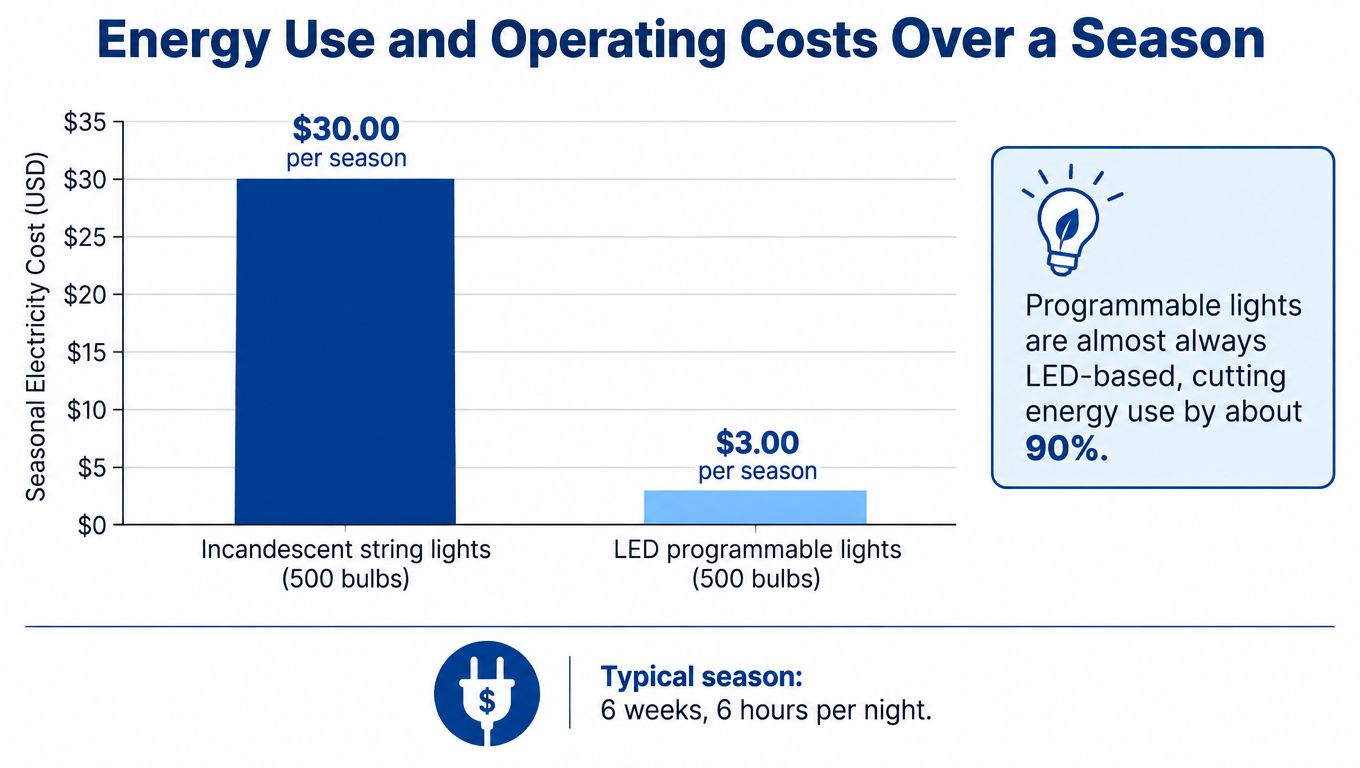
National Grid's seasonal lighting comparison priced a 100-light C-9 string running six hours daily, from November 26, 2021, through January 8, 2022, at $0.15 per kilowatt-hour: incandescent lights drew 700 watts and cost approximately $27.09, while comparable LEDs drew 100 watts and cost approximately $3.87.
That's an example, not a quote for your installation. A large illuminated menorah, its controller, and additional decorations need a budget based on their actual rated demand and your venue's tariff.
The graphic below illustrates the cost-comparison concept. Its illustrative prices and season assumptions shouldn't replace the documented comparison above or your equipment specifications.
- Record demand: Include lights, controllers, and related powered accessories.
- Define useful hours: Match operation to public viewing and event needs.
- Separate costs: Electricity, installation labor, storage, and replacement parts belong on different budget lines.
Scheduled shutoff avoids paying for illumination after the intended viewing period. For institutions repeating the installation each season, retain the operating plan with the equipment records so next year's organizer doesn't have to reconstruct the budget.
Buying and Compatibility Considerations
Choose the control requirements first, then select compatible lights. A fixture can look excellent in a demonstration yet be awkward for staff to operate after the installer leaves.
Begin with an ordinary evening at your venue. Who starts the display? Who can override it? Can the closing team operate it without borrowing a phone? These questions reveal whether you need a simple local controller, shared platform access, or a more elaborate arrangement.
Ask for evidence, not feature labels
- Compatibility: Request a demonstration using the platform your staff will use. Apply the distinction between basic control and advanced effects established earlier.
- Expansion: Ask which fixtures and accessories can be added, whether connectors are interchangeable, and what limits the controller imposes.
- Outdoor suitability: Check the ratings of the fixture, power supply, controller, and connections separately. An outdoor-rated light doesn't establish that every component can remain exposed.
- Serviceability: Establish whether staff can obtain replacement controllers, cables, and mounting hardware.
- Warranty and support: Read coverage conditions and ask how the supplier handles troubleshooting during the holiday period.
An IP rating describes protection against ingress, including solids and water. Don't translate a rating into a blanket promise of weatherproof operation. Ask the vendor to explain its suitability for your mounting position and exposure, including the restrictions in the installation instructions.
Brightness and pixel count should follow the display's purpose. A recognizable menorah viewed across a plaza has a different job from an animated window installation. More separately controlled points won't necessarily make the message clearer.
Compare lighted Hanukkah decorations against that written specification rather than buying from photographs alone. Ask how the intended nightly behavior is configured, what staff can override, and how the equipment resumes after an interruption.
Buying test: Have someone other than the demonstrator operate the proposed system. If they can't identify the normal mode and shutdown control, clarify the workflow before purchasing.
Keep the approved configuration simple enough that rotating staff can use it without becoming lighting technicians.
Setup, Operation, and Venue-Ready Safety
Assemble and test the equipment somewhere accessible before mounting it in its final position. Inspect the supplied parts, identify the controller and power components, and follow the manufacturer's mounting instructions. Don't make the public opening your first complete test.
Venue safety requires its own commissioning process. Shaffer Construction's holiday-light safety guidance identifies GFCI protection, outdoor-rated cords, dry and raised connections, circuit-load distribution, and shutting displays off when unattended as important outdoor-lighting precautions.
Commission the installation
- Confirm the power route: Have a qualified electrician or authorized facilities professional verify available circuit capacity, existing loads, and the required protection.
- Map the connections: Label the circuits serving the display. Different outlets aren't necessarily different circuits.
- Protect the public route: Keep connections away from standing water and use suitable cable protection where people cross.
- Configure the controls: Pair only as required by the chosen system, enter the approved scenes, and verify calendar settings.
- Test failure responses: Check recovery after a power interruption and demonstrate the physical disconnect to the responsible staff.
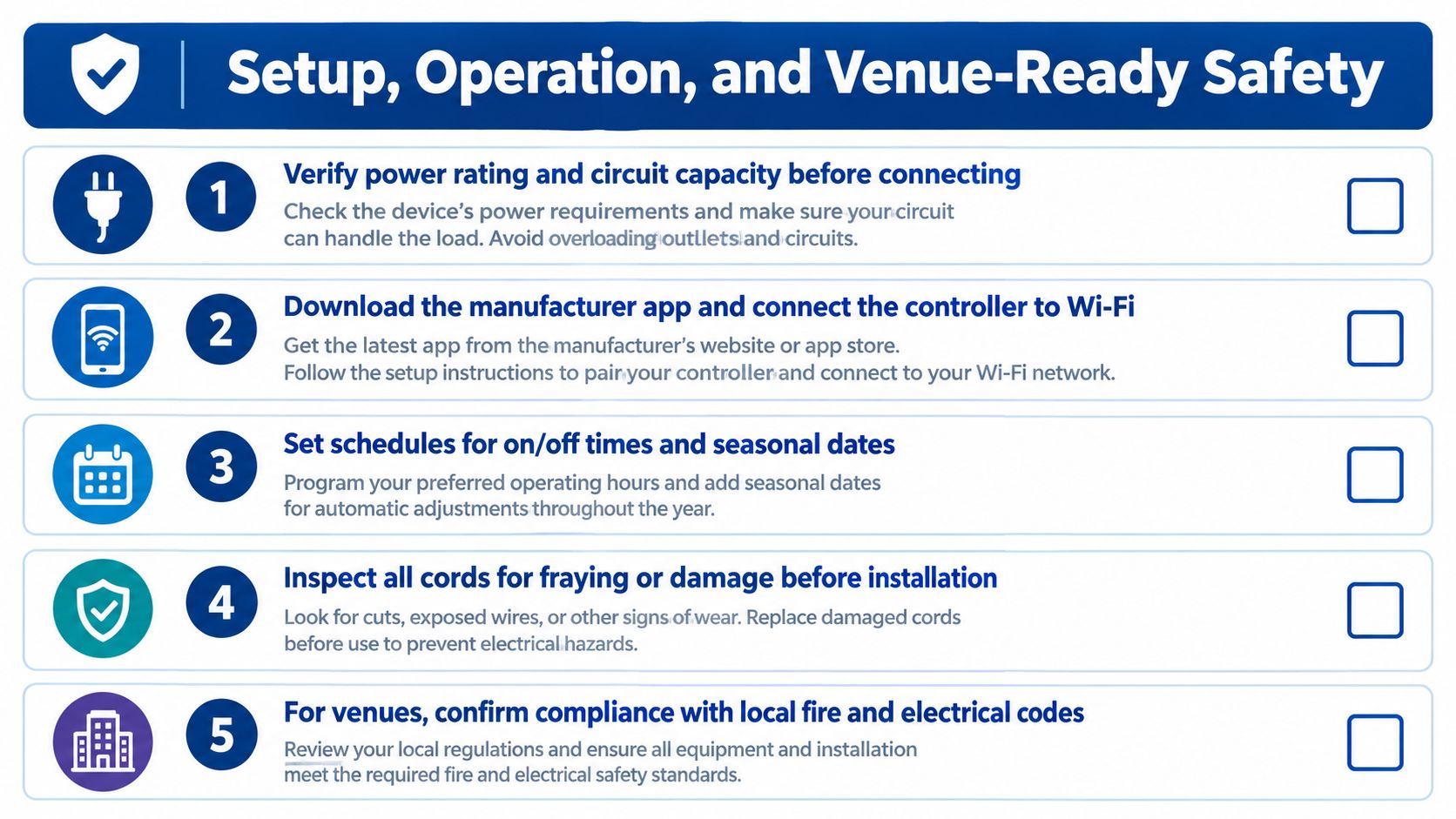
Use this visual as a starting checklist. App pairing applies only to systems that require it.
For commercial planning, Cultivate House Detailing's holiday lighting tips for businesses can complement your venue's installation discussion. An outdoor holiday display still needs a site-specific assessment, regardless of its advertised weather resistance.
Make closing responsibilities explicit
Give the closing operator a written procedure: confirm the display is off, isolate its power as required by the approved site plan, and inspect for damage or displaced connections. Leave unrelated security and emergency lighting under the venue's normal controls.
After adverse weather, inspect before restarting. Don't repeatedly reset protection that trips or handle wet, damaged electrical equipment.
Safety boundary: A phone's off button isn't a substitute for an accessible physical disconnect.
Name the facilities contact and event contact on the handoff sheet. Automation can reduce routine switching, but someone still needs responsibility for inspection, exceptions, and safe shutdown.
Season-End Checklist and What Comes Next
Pack the display for the person who'll install it next season, not just for the person taking it down. A box of unlabeled cables and a controller with unknown settings turns a reusable installation into a troubleshooting project.
Before dismantling, photograph the approved arrangement and record the working configuration. Keep those records in a venue-controlled location rather than only on a volunteer's phone.
Store the equipment and the operating knowledge
- Label components: Mark cables by destination and bag mounting hardware with the matching fixture.
- Follow storage instructions: Clean and dry equipment as directed. Remove replaceable batteries where the manufacturer recommends it.
- Record faults: Tag damaged parts so they aren't accidentally returned to service.
- Preserve access: Retain authorized account details, manuals, and supplier contacts securely.
- Schedule a preseason test: Check equipment before committing staff and public opening dates.
Treat new technology as something to verify, not something to assume. Broader platform support, dependable offline scheduling, and clearer accessibility controls are useful capabilities to watch for, but request a working demonstration before replacing equipment.
Ask vendors whether programs can be backed up, restored, and transferred to replacement hardware. Also ask whether an accessible steady mode can be recalled directly, without navigating through animated presets.
The strongest seasonal upgrade may be a clearer operating sheet rather than another effect. When the mounting plan, approved program, and shutdown procedure stay together, the next organizer can concentrate on the gathering instead of rediscovering how the display works.
Menorah offers indoor and outdoor display menorahs, including illuminated LED options with programmable modes, along with accessories and setup resources. Visit Menorah to compare a display with your venue's requirements and ask about nightly operation, mounting, and support before planning your installation.